AERONET Instrument Troubleshooting Interface - Solutions for CIMEL EXTERNAL BATTERY NEGATIVE TREND Flag
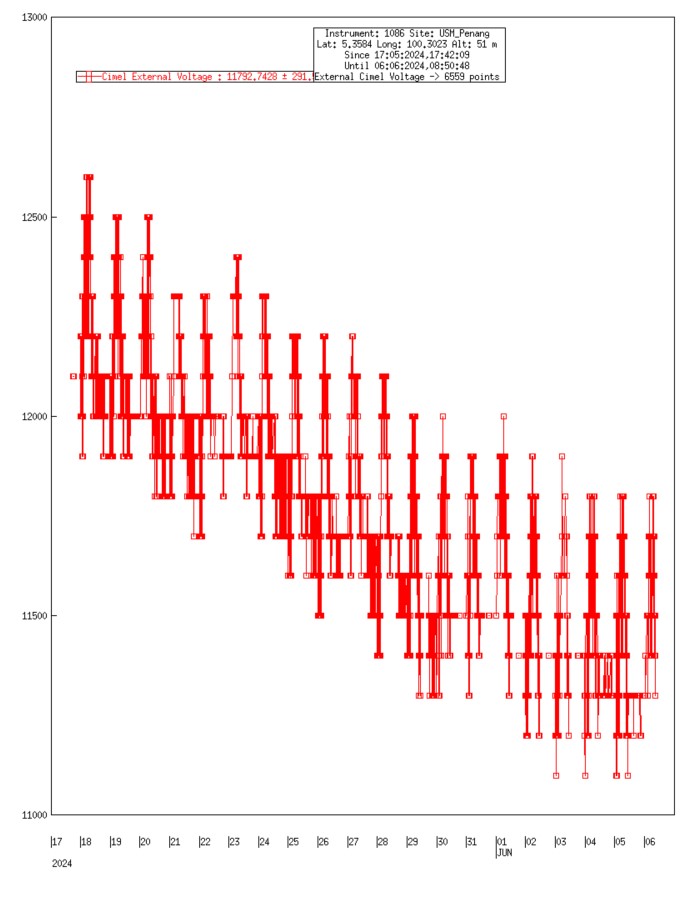
Description The instrument draws power from an external 12 V battery . This flag is raised when the daily average battery voltage shows a declining trend over the past month that exceeds a defined slope threshold, suggesting the battery is losing capacity or connections have degraded. A slow downward trend is typically due to aging or oxidized terminals rather than a sudden failure.
Condition(s) Include battery voltage trends for all 3 batteries: Scan daily average battery voltages for previous month; flag if the trend is less than -0.5V for DCP and Cimel External 12V batteries; flag if the trend is less than -0.2V for Cimel 6V internal battery
Models 4 and 5: VIEW > BAT (disconnect solar panel before checking) Model T: MEASURES > Battery (disconnect solar panel before checking)
Solution Level 1 (< 5 minutes) 1. Check/reseat all connections between solar panel and control box. 2. Check/reseat connector panel. 3. Check/reseat connections going to external battery.